EU:n tietosuoja-asetus (GDPR) ja Suomen tietosuojalaki rajoittavat henkilötietojen siirtoa tai luovutuksia EU:n ulkopuolelle. Säädösten tarkoituksena on suojata rekisteröityjä myös Euroopan ulkopuolisissa maissa.
Tietosuojasäädösten mukaan henkilötietoja voidaan siirtää EU:n ulkopuolelle, jos Euroopan komissio on todennut maan tietosuojan tason riittäväksi tai jos käytetään lainsäädännössä mainittuja siirtomekanismeja ja/tai riittäviä suojatoimenpiteitä.
Kielipankissa olevaa, henkilötietoja sisältävää aineistoa saa käsitellä vain aineistokohtaisen lisenssin ja tietosuojaehtojen mukaisesti. Joidenkin aineistojen siirtäminen Euroopan ulkopuolelle voi olla rajoitettua tai kokonaan kiellettyä.
Yleensä Kielipankista voidaan luovuttaa henkilötietoja sisältäviä aineistoja samoilla ehdoilla kaikkiin seuraaviin maihin (huomaa, että nämä tiedot saattavat muuttua ja yksittäisten aineistojen osalta voi olla poikkeuksia):
Jos kirjaudut Kielipankin palveluun jonkin Euroopan ulkopuolella sijaitsevan organisaation käyttäjätunnuksella ja haet pääsyä Kielipankissa olevaan, henkilötietoja sisältävään aineistoon, varaudu siihen, että hakemuksesi käsittely voi olla tavallista monimutkaisempaa ja käsittelyaika normaalia pidempi. Tarvitsemme sinulta silloin myös muutamia lisätietoja, jotta hakemuksesi voidaan käsitellä. Lisäohjeita on alempana tällä sivulla.
Huom. Helsingin yliopiston ohjeiden (päivitetty 11.12.2025) mukaan tietojen ’siirroksi’ tai ’luovutukseksi’ ei katsota esimerkiksi sitä, että Helsingin yliopiston tutkija käsittelee omaan tutkimukseensa liittyviä tietoja ollessaan fyysisesti EU- tai ETA-alueen ulkopuolella vaikkapa konferenssissa.
Jos käyttäjä aikoo käsitellä aineistoa edellisessä kohdassa mainittujen alueiden ulkopuolella, Kielipankissa olevan aineiston rekisterinpitäjän täytyy tapauskohtaisesti arvioida, turvaako vastaanottajamaan lainsäädäntö rekisteröityjen oikeudet ja kyetäänkö henkilötietoja suojaamaan siellä riittävästi.
Siirron mahdollistamiseksi voidaan joskus tehdä sopimus aineiston tietosuojaehdoissa mainitun rekisterinpitäjän ja vastaanottavan organisaation välillä.
Voit tehdä aineiston käyttöoikeutta koskevan hakemuksen normaalisti Kielipankin oikeudet -palvelussa, jos voit kirjautua sinne kotiorganisaatiosi myöntämällä käyttäjätunnuksella tai CLARIN-tunnuksella. Varmistathan kuitenkin ensin, ettei siirtäminen ole aineistokohtaisen lisenssin mukaan kiellettyä.
Mikäli kuulut organisaatioon, joka sijaitsee aiemmin mainittujen alueiden ulkopuolella, pääsyä Kielipankissa olevaan, henkilötietoja sisältävään aineistoon ei voida myöntää ilman rekisterinpitäjän tekemää tapauskohtaista riskiarviointia. Tästä syystä hakemuksen käsittely todennäköisesti kestää tavallista kauemmin. Hakemuksesi ohella tarvitsemme sinulta myös joitakin lisätietoja.
Päätöksen Kielipankissa olevan, henkilötietoja sisältävän aineiston luovuttamisesta EU:n ulkopuolelle tekee aineiston edelleen välittämisestä vastaava rekisterinpitäjä (yleensä joko Helsingin yliopisto tai jokin muu yliopisto). Rekisterinpitäjä arvioi, voidaanko rekisteröityjen oikeudet turvata riittävällä tavalla kyseisessä vastaanottajamaassa.
Kielipankki pyytää sinulta arviointia varten tarvittavat perustiedot ja välittää ne asianomaiselle rekisterinpitäjälle. Tarvittaessa rekisterinpitäjä voi pyytää sinulta erikseen muitakin tietoja tilanteen selvittämiseksi.
Jotta hakemuksesi voidaan käsitellä, toimita Kielipankille seuraavat tiedot:
Jos aineistokohtaisissa tietosuojaehdoissa mainittu rekisterinpitäjä arvioi, että aineiston siirtäminen on riskeihin nähden perusteltua, rekisterinpitäjä voi tehdä vastaanottavan organisaation (sinun kotiorganisaatiosi) kanssa sopimuksen aineiston luovuttamisesta.
Aineiston siirtosopimukseen on mahdollista liittää esimerkiksi Euroopan komission antamat vakiosopimuslausekkeet. Lisäksi on kuitenkin vielä arvioitava, vaaditaanko henkilötietojen suojaamiseksi muita täydentäviä toimenpiteitä.
Täydentäviä suojatoimia voivat olla mm. muut sopimusehdot henkilötietojen suojaamisesta, siirrettävien henkilötietojen pseudonymisointi tai anonymisointi, säilytysaikojen rajaaminen, tutkittavan suostumus tietojen siirrolle ja aineiston kryptaus.
Huomaathan kuitenkin, että osapuolilla voi olla tällaisten sopimusten osalta erilaisia käytäntöjä, ja aikataulu saattaa venyä.
The transfer or disclosure of personal data outside the EU or the European Economic Area is restricted by the General Data Protection Regulation (GDPR) of the EU and the Data Protection Act in Finland. The purpose of these regulations is to protect the data subjects in countries outside Europe.
According to the data protection regulations, personal data may be transferred outside the EU in case the European Commission has determined that the country’s level of data protection is adequate, or by using the transfer mechanisms and/or adequate safeguards specified in the legislation.
Resources containing personal data stored in the Language Bank may only be processed in accordance with the resource-specific license including the data protection terms and conditions. For some resources, the transfer of data out of Europe may be restricted or forbidden.
In general, the Language Bank may disclose resources containing personal data to all of the following countries under the same conditions (note, however, that the information may change and exceptions may apply on individual resources):
If you log in to the Language Bank service with the user credentials of an organization located outside Europe and request access to a resource that contains personal data, please be aware that processing your request may be more complex and it may take longer than usual. We will also need some additional information from you in order to process your application. Further instructions are provided below on this page.
Please note that, for example according to the guidelines of the University of Helsinki (updated on December 11, 2025), if a researcher affiliated with the University of Helsinki processes the data related to their own research when they are physically located outside the EU or EEA for example to participate at a conference, this is not considered as ’transfer’ or ’disclosure’ of the data.
In case the user is going to process the data outside the above-mentioned areas, the controller of the resource deposited in the Language Bank must assess, on a case-by-case basis, whether the legislation of the recipient country is sufficient to maintain the rights of the data subjects and whether the personal data can be adequately protected.
To enable the transfer, a separate agreement can sometimes be made between the Controller (mentioned in the data protection terms and conditions) and the receiving organization.
You can submit a request for access to the material as normal via the Language Bank Rights service, in case you are able to log in with your home university account or with your user identity provided by CLARIN. However, please ensure in advance that the transfer is not forbidden by the resource-specific license.
In case you belong to an organization located outside the above-mentioned areas, access to a resource containing personal data in the Language Bank cannot be granted unless a case-by-case risk assessment has been completed by the data controller. For this reason, it may take longer than usual to process your application. Apart from your application, we will also need some additional information from you.
The decision to transfer personal data stored in the Language Bank to a country outside the EU is made by the controller who is responsible for the redistribution of the resource in the Language Bank (this would usually be either the University of Helsinki or another university). The controller will assess whether the rights of the data subjects can be adequately safeguarded in the recipient country in question.
The Language Bank will ask you to provide some basic information that is necessary for this assessment and we will forward the details to the appropriate controller. The controller may ask you to provide additional information for clarification if needed.
In order for your application to be processed, please provide the Language Bank with the following information:
In case the controller mentioned in the resource-specific data protection terms and conditions has assessed that the transfer of the data is justified in view of the risks, the controller can make an agreement on the transfer of the data with the organization receiving the data in the destination country (i.e., with your home organization).
One possibility is to include, for example, the standard contractual clauses issued by the European Commission in the data transfer agreement. However, it will still be necessary to assess whether other supplementary measures are required to protect the personal data.
The supplementary measures may include, for example, other contractual terms and conditions on data protection, pseudonymization or anonymization of the personal data to be transferred, limitation of storage periods, consent of the research subject to the transfer of data, and encryption of the data.
Please note, however, that the parties may have different practices regarding such agreements, and the process may take time.
In case special protective measures are required in order to process your research data, you may consider using the Sensitive Data services available at CSC. The SD services can support you in processing your research data securely. SD Connect (for storing and sharing data) and SD Desktop (for processing and computing) provide an environment isolated from the Internet, accessible for you and your colleagues only.
Before starting a Sensitive Data project, make sure that you have carefully assessed the risks concerning your dataset. SD services should only be used when necessary, since the possibilities for processing the data within SD Desktop are intentionally limited.
For up-to-date details, please refer to the documentation provided by CSC at https://docs.csc.fi/data/sensitive-data/.
Jos tutkimusaineiston käsittely edellyttää erityisiä suojatoimenpiteitä, voit harkita CSC:n tarjoamien, arkaluonteisille aineistoille suunnattujen Sensitive Data (SD) -palveluiden käyttöä. SD-palvelut auttavat käsittelemään tutkimusdataa turvallisesti. SD Connect -alusta (tiedostojen tallentamiseen ja jakamiseen suojatusti) ja SD Desktop -ympäristö (aineiston suojattuun käsittelyyn ja laskentaan) muodostavat Internetistä eristetyn työskentelyalueen, joka on vain sinun ja kollegoidesi käytössä.
Ennen kuin käynnistät SD-projektin, varmista, että olet arvioinut aineistoosi liittyvät riskit huolellisesti. SD-palveluita kannattaa käyttää vain, mikäli se on välttämätöntä, koska aineistojen käsittelymahdollisuudet SD Desktopissa ovat tarkoituksella rajalliset.
CSC:n tarjoamat ajantasaiset ohjeet löytyvät osoitteesta https://docs.csc.fi/data/sensitive-data/.

The EU is in the process of creating an internal market for all types of data. The aim is to ensure that data can be shared from one stakeholder to another within the region, in accordance with the EU legislation. Data sharing requires interactive networks – data spaces – that can connect data providers and users, and offer a platform for them to communicate, make contracts and trade with each other.
All the upcoming European data spaces will be developed in line with the European Data Strategy. There are development plans for data spaces for approximately 15 different strategic fields. According to the vision, data spaces will allow for the commercialisation and more efficient re-use of data. This will benefit not only commercial stakeholders in the EU, but also EU citizens by providing them with better digital services, for example. In addition, researchers could gain access to new types of data and materials, which could boost basic research and increase opportunities for product development and innovation.
The European Language Data Space (shortened: LDS) is an ecosystem for the sharing and commercialisation of language data, such as text and speech data, and for the development of large language models and language-centric Artificial Intelligence. The Language Data Space is being developed and coordinated by the LDS Consortium, which was established in early 2023 with the support of the European Commission. The first phase of the LDS will last three years and during this period, the technical and legal framework for the operation of the common language data platform will be established in cooperation with the various stakeholders.
The work on the language data space will also be driven forward by ALT-EDIC, the language technology alliance of EU member states established in early 2024. In particular, ALT-EDIC aims to ensure the development of EU-based large language models.
The Language Data Space will be built partly on top of existing networks and language technology infrastructures. Sitra’s publication Snapshot of Finnish data spaces (2024) summarises well the current situation in Finland with regard to language technologies and the Language Data Space (in Finnish).
In spring 2024, the LDS Consortium launched a series of country-specific workshops to share information about the possibilities of the common Language Data Space, and to reach as many stakeholders in each member country as possible. The workshops are organised in collaboration with local institutions. In April 2024, Finland had the honour of being the first EU member state to host an LDS workshop. The event was organised locally by the University of Helsinki. More information on workshops in other EU countries and upcoming LDS events can be found on the Language Data Space website.
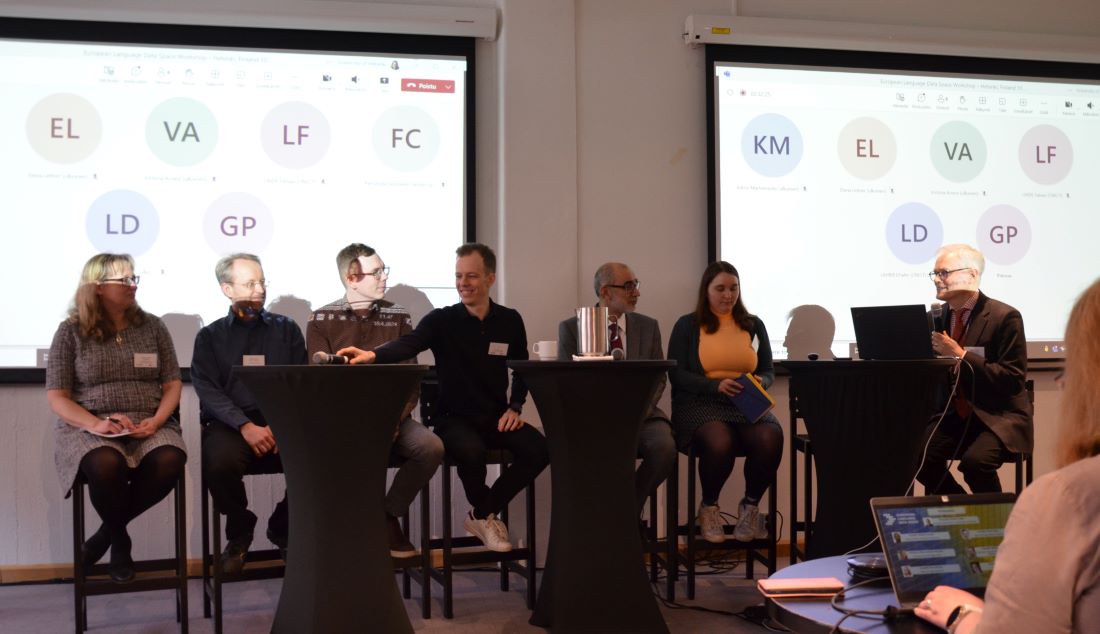
The Finnish LDS workshop provided an opportunity for organisations and companies in Finland to exchange ideas on the possibilities and challenges that a common platform and marketplace for language models and data could offer. As remote presenters, the workshop featured Philippe Gelin from the European Commission, and Georg Rehm from DFKI in Germany. In the panel discussions (see photos below), partners from the LAREINA project coordinated by the University of Helsinki shared their views on the importance of language data and on the challenges regarding the availability and technical quality of data or regarding copyright constraints. Without access to electronic data of sufficient quality and scope, it is difficult to develop language models for speakers of small and medium-sized languages.
After the LDS workshop, Finland initiated the membership process to join ALT-EDIC as an observer member. After summer 2024, the full membership of Finland in ALT-EDIC was confirmed for the next three years. The administrative representative of Finland in ALT-EDIC is the Ministry of Transport and Communications, with whom the University of Helsinki aims to maintain an active dialogue.
Language Data Space invites European stakeholders to join the LDS User Group. The group includes commercial stakeholders from different sectors as well as representatives from both public administrations and research. The news from the remote meeting of the LDS User Group in November 2024 can be found here. Joining the LDS User Group is done via a form that can be found on the LDS website. In particular, language data providers and utilisers, as well as language model developers, are warmly welcome to join the group.
At the end of 2024, the Language Data Space is entering the pilot phase, where the Language Bank of Finland is also actively involved. The aim is to test the pilot version of the LDS platform in Finland and to collect user feedback. The Language Bank of Finland is also planning to organise a workshop in spring 2025 on the Language Data Space, ALT-EDIC and copyright issues. We will inform about this upcoming event on our website and through the LAREINA project.
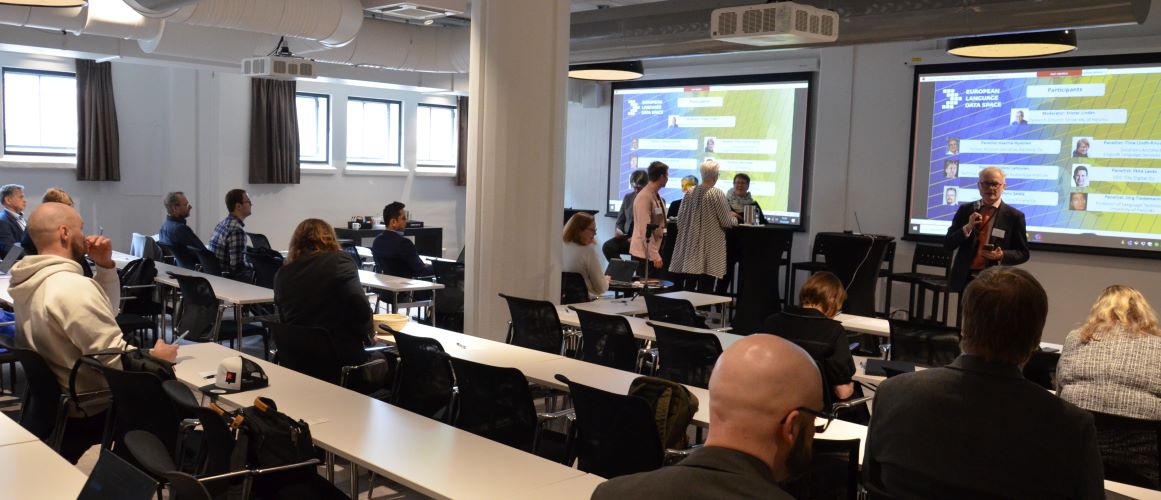
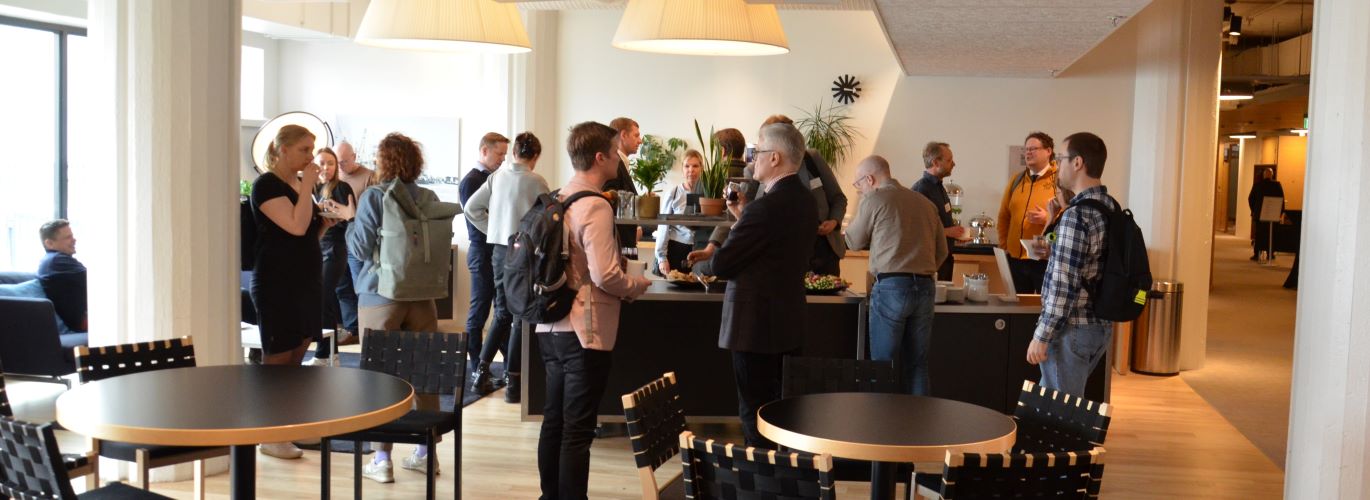
All photos in the article: Jyrki Niemi / University of Helsinki
Helmikuussa 2022 tehdyn Kielipankin yleisten ehtojen ja aineistokohtaisten käyttöehtojen päivityksen jälkeen kävi ilmi, että luvanvaraisia aineistoja koskeviin CLARIN RES -tyyppisiin lisensseihin kaivattiin vielä tarkennusta. 24.5.2022 alkaen RES-lisenssien uusi versio 2.1 alkaa seuraavalla tavalla (muuttuneet kohdat lihavoitu):
”Oikeudenhaltija myöntää Käyttäjälle henkilökohtaisen maksuttoman, ei-yksinomaisen ja pysyvän (tekijänoikeuden voimassaoloajan kestävän) oikeuden käyttää ja kopioida Aineistoa Käyttäjän kanssa sovittuun tarkoitukseen muutettuna, muuttamattomana tai osana yhteenliitettyä teosta. […]”
Luvanvaraisten aineistojen uudet käyttäjät hyväksyvät loppukäyttäjän lisenssin uusimman version ennen hakemuksen tekemistä Kielipankin oikeudet -palvelussa. Lisenssien muutoksista ilmoitetaan vielä erikseen sähköpostitse niille käyttäjille, joilla on ennestään Kielipankin oikeudet -palvelun kautta myönnetty pääsy yhteen tai useampaan rajoitettuun aineistoon.
Linkki yksittäisen aineiston lisenssiin löytyy Kielipankin aineistoluettelosta tai kyseisen aineistoversion kuvailutietueesta (ks. Documentation).
Kooste Kielipankin soveltamien loppukäyttäjän lisenssien sisällöstä, erilaisten lisäehtojen mahdollisista yhdistelmistä ja näissä äskettäin tapahtuneista muutoksista löytyy sivulta CLARIN-aineistojen loppukäyttäjän lisenssit.
After the general update of the Terms of Use of the Language Bank of Finland and the resource-specific end-user licenses that took place in February 2022, it turned out that a further clarification was required for CLARIN RES type licenses. Starting on 24th May 2022, the new version 2.1 of the RES license begins in the following way (here, the changes are bolded):
”The Rightholder grants the End-User a personal free, non-exclusive and perpetual (for the duration of the copyright) right to use and make copies of the Resource for the purpose agreed with the End-User as such, as modified, or as part of a compilation or derived work. […]”
New users of restricted resources must accept the end-user licenses before applying for access via Language Bank Rights. Those users who already have access to one or more restricted resources will be notified about license changes to the email address that was provided along with their application.
The link to the license of an individual resource can be found on the list of corpora in the Language Bank of Finland or via the metadata record (see Documentation) of the resource version in question.
Please see CLARIN End-User License Agreements (EULA) for an overview of the changes that have recently taken place in the end-user licenses applied by the Language Bank.
The Terms of Use of the Language Bank of Finland and the resource-specific license terms and conditions have been updated.
The Terms of Use of the Language Bank of Finland and the General Terms of Use for CSC’s Services for Research and Education are binding to all users of the Language Bank of Finland. In addition, the users are required to comply with the resource-specific terms and conditions.
Read the general terms as well as the resource-specific licenses carefully. The link to the license of a given resource is provided in the metadata record of the resource in question and on the list of resources of the Language Bank.
During the spring, the licenses of all resources that contain personal data will be supplemented with resource-specific data protection terms and conditions. In case you notice that the data protection terms and conditions have not yet been specified for the resource you are planning to use, please follow the guidelines for processing corpora stored in the Language Bank of Finland that contain personal data and contact the Language Bank in case you need further information regarding data protection.
Notifications about updates regarding the licenses of individual resources will be published on the Language Bank website as well as emailed to the users who have access to the resource on the basis of a separate application.
Kielipankin yleiset käyttöehdot on päivitetty. Samalla on täsmennetty myös aineistokohtaisia käyttöehtoja.
Kielipankin yleiset käyttöehdot sekä CSC:n tutkimuksen ja opetuksen palvelujen yleiset käyttöehdot sitovat kaikkia Kielipankin käyttäjiä. Lisäksi käyttäjien on noudatettava aineistokohtaisia ehtoja.
Tutustu yleisiin käyttöehtoihin ja jokaisen käyttämäsi aineiston käyttöehtoihin huolellisesti. Linkki yksittäisen aineiston lisenssiin löytyy kyseisen aineiston kuvailutietueesta ja Kielipankin verkkosivuilla olevasta aineistoluettelosta.
Henkilötietoja sisältävien aineistojen (PRIV-merkintä) lisensseihin lisätään kevään aikana aineistokohtaiset tietosuojaehdot. Jos tietosuojaehtoja ei jonkin käyttämäsi aineiston osalta vielä ole, noudata ohjeita henkilötietoja sisältävien Kielipankin aineistojen käsittelyyn ja pyydä tarvittaessa lisätietoja Kielipankista.
Aineistokohtaisten käyttöehtojen päivityksistä ilmoitamme jatkossa Kielipankin verkkosivuilla sekä sähköpostitse niille käyttäjille, jotka ovat saaneet erillisellä hakemuksella pääsyn aineistoon.
Kielipankin aineistokohtaisiin käyttöehtoihin on alkuvuoden 2022 aikana tulossa joitakin tarkennuksia ja täydennyksiä. Näkyvimpänä muutoksena ovat aineistokohtaiset tietosuojaehdot, jotka lisätään kaikkien henkilötietoja sisältävien aineistojen käyttöehtoihin uutena osiona. Ilmoitamme yksittäisten aineistojen käyttöehtoihin liittyvistä päivityksistä Kielipankin verkkosivuilla.
Kielipankissa oleva aineisto sisältää henkilötietoja, jos sen lisenssissä on merkintä +PRIV. Tällöin sitoudut käsittelemään aineiston sisältämiä henkilötietoja luottamuksellisesti, huolellisesti ja vain siihen käyttötarkoitukseen, jota varten olet saanut aineistoon pääsyn. Muut henkilötietojen käsittelyä koskevat rajoitukset kerrotaan aineistokohtaisissa tietosuojaehdoissa. Katso myös Kielipankin yleiset ohjeet henkilötietoja sisältävien aineistojen käsittelyyn.
Kun ryhdyt käyttämään Kielipankissa olevaa henkilötietoja sisältävää aineistoa uudessa hankkeessa tai uuteen tarkoitukseen, ilmoita hankkeesi lyhyt ja yleistajuinen otsikko sekä avoimesti saatavilla olevan tietosuojaselosteen linkki Kielipankille tällä lomakkeella. Julkaisemme antamasi tiedot Kielipankin verkkosivuilla, jolloin ne ovat kaikkien aineiston käytöstä kiinnostuneiden nähtävillä.
Muistathan tutustua jokaisen käyttämäsi aineiston käyttöehtoihin huolellisesti. Jos jokin käyttöehdoissa askarruttaa tai et löydä tässä vaiheessa kaikkia tarvitsemiasi tietoja, kysythän Kielipankista lisää.
In the Language Bank of Finland, a given resource may be available as several different versions or variants that are provided for different purposes. For instance, the resource may be offered as a downloadable version, but there may also be a variant that is searchable via Korp.
In order to make it more convenient for users to locate the corpus version they need, we started creating resource group pages that provide an overview of all the available versions of the resource in question. For instance, all the resource versions that are included in the Plenary Sessions of the Parliament of Finland (eduskunta) resource group can be found at https://www.kielipankki.fi/corpora/eduskunta/.
All the resources that are available via the Language Bank of Finland are listed on the Corpora page, https://www.kielipankki.fi/corpora/. For each individual resource version mentioned on the list, you can find links to the
When citing the resource, please refer to the specific resource version that was used. This will make your research easier to replicate.
Samasta aineistosta voi olla yhtä aikaa saatavilla useita erilaisia versioita, joista käyttäjä voi valita omiin tarkoituksiinsa sopivimman. Tietty aineisto voi esimerkiksi olla tarjolla sekä omalle koneelle ladattavana versiona että Korp-palvelun kautta tutkittavana versiona.
Jotta sopivan aineistoversion löytäminen kävisi helpommin, tietystä aineistosta tehdyt versiot ja muunnelmat on ryhdytty keräämään yhteen uusille aineistoryhmien tietosivuille. Esimerkiksi viimeisimmät Eduskunnan täysistunnot (eduskunta) -ryhmään kuuluvat aineistoversiot voi tarkistaa osoitteesta https://www.kielipankki.fi/aineistot/eduskunta/.
Kaikki Kielipankin kautta välitettävät aineistot on tuttuun tapaan lueteltu Kielipankin aineistosivulla, https://www.kielipankki.fi/aineistot/. Aineistosivulla olevassa taulukossa on linkit kunkin aineistoversion
Kun viittaat aineistoon, mainitsethan sen aineistoversion viitetiedot, jota olet käyttänyt. Näin tutkimuksesi on helpommin toistettavissa.
Ylen artikkelissa kerrotaan Lahjoita puhetta -kampanjan merkityksestä Suomelle ja suomen kielelle. Myös Kielipankki on mainittu!
Helsingin yliopiston uutispalstalla kerrotaan Lahjoita puhetta -kampanjasta, jossa myös Kielipankki on mukana. Mari Peltosen haastateltavina olivat Krister Lindén ja Mietta Lennes.
Did you know that the Language Bank of Finland offers reference instructions, including a persistent identifier, for each and every corpus version? You should include the reference in all publications where the corpus in question has been used.
Systematic citation practices make your study easier to replicate, and the corpus compilers can be recognized for their work.
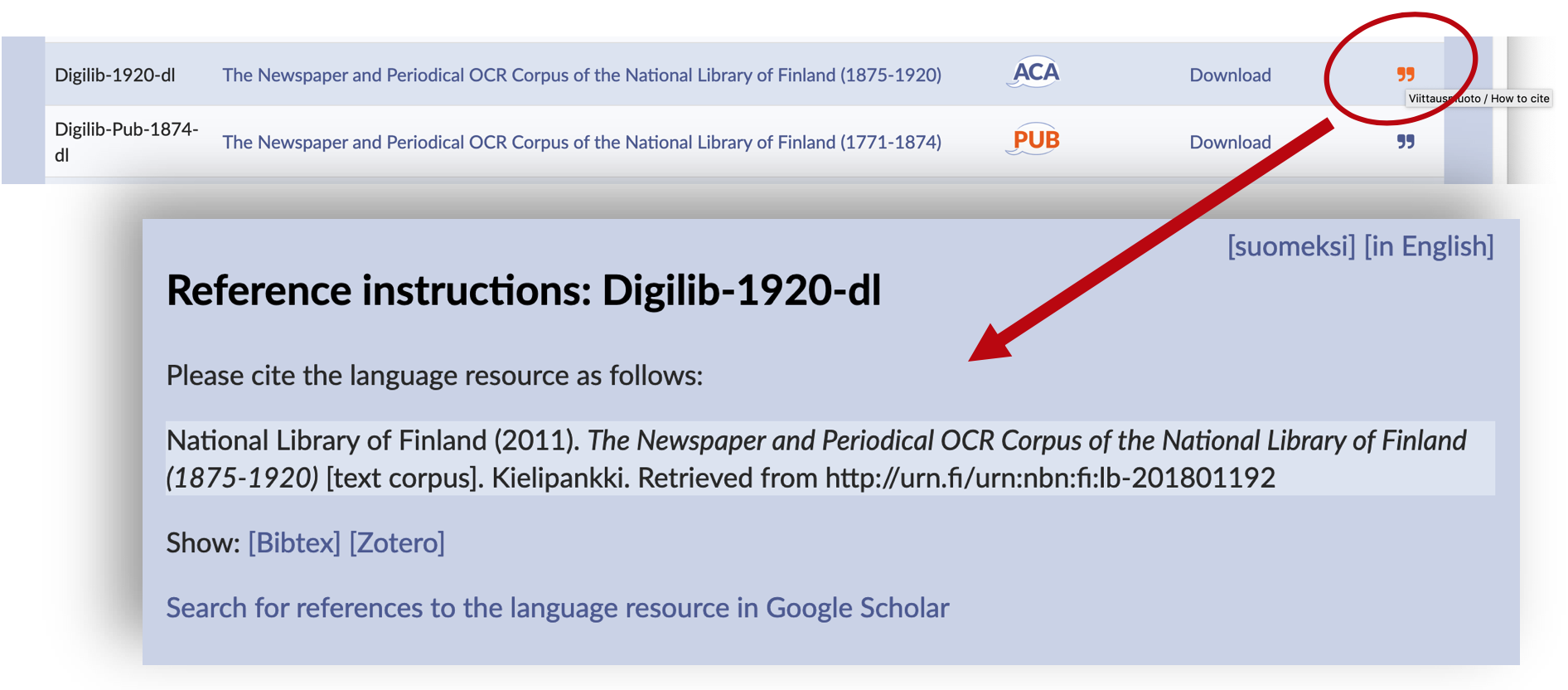
Tiesitkö, että Kielipankki tarjoaa jokaiselle aineistolle ja sen eri versioille valmiin viittausohjeen, joihin sisältyy aineiston pysyvä tunniste? Tiedot kannattaa lisätä lähdeluetteloon kaikissa julkaisuissa, joissa kyseistä aineistoa on hyödynnetty.
Yhtenäinen viittaustapa helpottaa tutkimuksen toistamista. Samalla aineistojen koostajat saavat tunnustuksen työstään.

It is important to cite language resources (corpora and tools) in a coherent way. This will enable other researchers to replicate your research, and the authors or developers of the resource can receive credit for their work.
By providing a reference to the Language Bank of Finland and to its language resources, you can also help FIN-CLARIN keep track of the usage of its corpora and services and maintain the Language Bank of Finland.
When you use a language resource (a corpus or a tool) that is available via the Language Bank of Finland, please adhere to the citation instructions provided by the Language Bank. This way, you provide an accurate reference to the exact version of the resource. In the Language Bank of Finland, every resource version has a unique persistent identifier that is always included in the reference. The identifier exists in order to ensure that the resource can be accessed and the study can be replicated in the future even if the location of the resource changes.
The license conditions of many corpora and tools require the users to provide a reference to the resource in question. In this case, the license terms will usually mention the BY condition (Attribution; Nimeä in Finnish). A reference is systematically required for all language resources that are licensed for academic use (CLARIN ACA) or for individual use (CLARIN RES). Even openly licensed language resources may require appropriate citation (e.g., Creative Commons Attribution and other open licenses).
Reference instructions for individual corpus versions or variants can be found by clicking on the quotation mark on the Corpora list of the Language Bank of Finland.
The reference instructions are also mentioned in the metadata of each language reource. The metadata of the corpora that are available via the Language Bank of Finland are stored and distributed on the COMEDI service, and the same information is also shown, e.g., via the Virtual Language Observatory. The metadata record of a specific language resource can always be accessed with the persistent identifier that is included in the citation instructions, or by clicking on the corpus title on the corpus list of the Language Bank. In the metadata record, the link to the reference instructions can usually be found under Resource documentation info. In some cases, the citation instructions are directly available in the Distribution info: Attribution text field. The metadata record also provides details on the corpus-specific license.
For corpus versions that are offered via the Korp concordancing service, the link to the citation instructions is available in the corpus information frame that pops up when the mouse cursor is moved over a corpus title in the corpus selection menu, as well as under the corpus details in the information column on the right when an individual search result is selected in the concordance view.
In case the resource is available via the download service of the Language Bank of Finland, it includes a file called README containing the persistent identifier of that particular resource version.
As an example, here are the reference instructions to the language resource titled Corpus of Finnish Magazines and Newspapers from the 1990s and 2000s, Version 2:
University of Helsinki (2017). Corpus of Finnish Magazines and Newspapers from the 1990s and 2000s, Version 2 [data set]. Kielipankki. http://urn.fi/urn:nbn:fi:lb-2017091901
Note that the exact formatting practices of data references may vary in different publications. In any case, it is best to try and include the details that are included in the citations instructions provided by the Language Bank of Finland. When you are writing scientific journal articles or producing other research output, you may need to check the publication-specific instructions in order to see whether it is customary to include data sources in the bibliography or to create a separate list for them.
To refer to the Language Bank of Finland as a resource publisher/distributor, please use the persistent identifier https://doi.org/10.17616/R3ND16.
In case you wish to refer to the Language Bank of Finland as a live collection of services, you can use the web address www.kielipankki.fi.
A presentation of the FIN-CLARIN consortium on the web portal of the Language Bank of Finland: http://urn.fi/urn:nbn:fi:lb-2014120212
The general reference instructions of CLARIN ERIC and CLARIN services can be found under CLARIN Frequently Asked Questions.
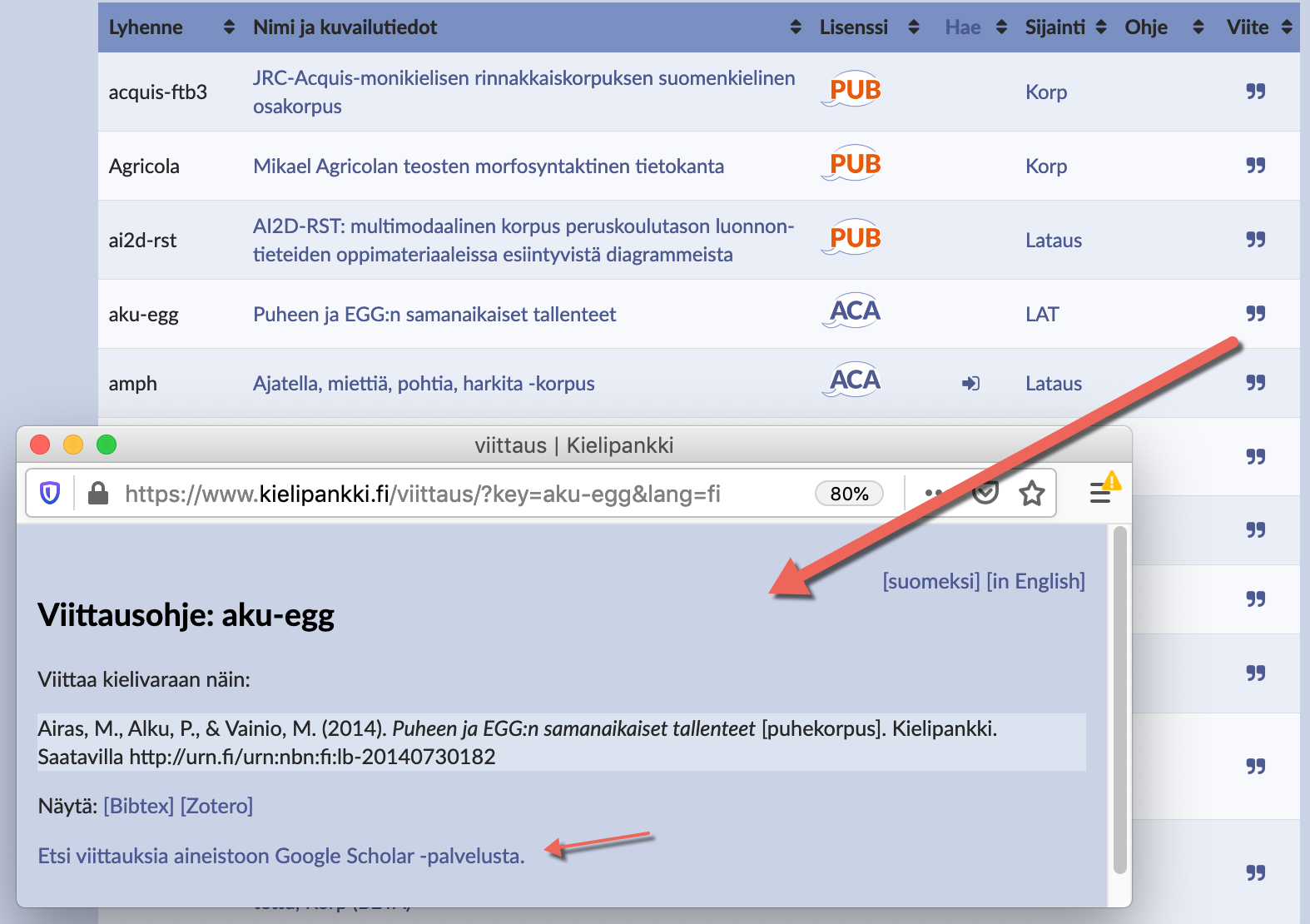
The Language Bank of Finland provides citation instructions for all corpus versions. The reference instructions are accessible from the Corpora list of the Language Bank of Finland (click on the double quotes ) and from the metadata of each corpus. On the reference instruction page, you can now also find a link to a Google Scholar query for publications related to the corpus in question.
The links to Google Scholar are generated automatically by the Language Bank of Finland. In the links, the persistent identifier (PID) and the title of the corpus are used as optional search criteria.
Persistent identifiers have been used by the Language Bank since the year 2014. A unique persistent identifier is included in the reference instructions for each corpus distributed via the Language Bank of Finland. The identifiers will allow for specific corpus versions (or at least information about their status) to be retrieved even if their access locations, tools and methods change in the future.
References to research data sets are equally relevant as references to other scientific sources. Accurate references will help other researchers replicate your study. In addition, both your publications and the data sets you used will gain more visibility.
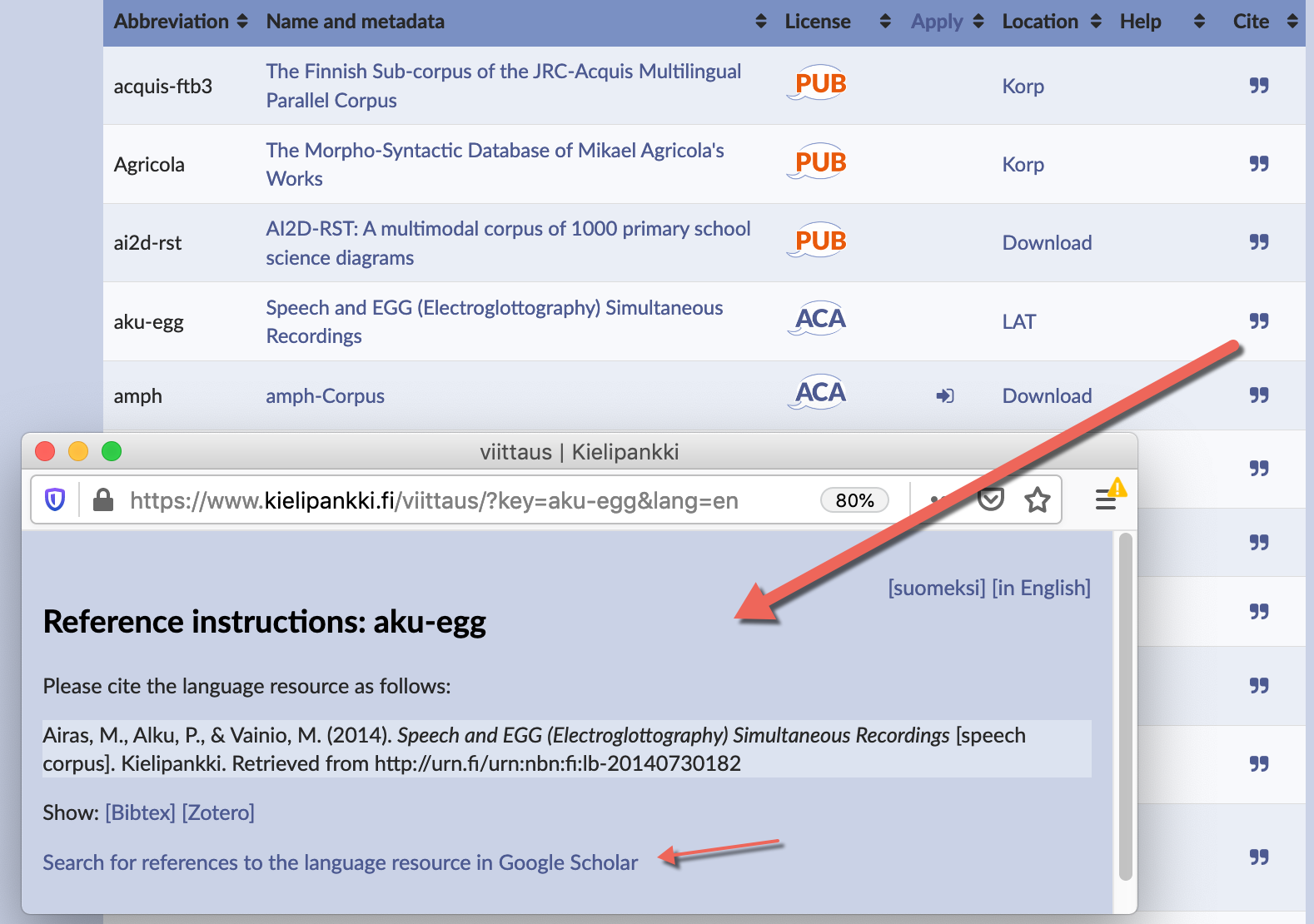
Kielipankin kautta välitettävien aineistojen jokaisella eri versiolla on oma viittausohje. Aineistokohtaiset ohjeet löytyvät Kielipankin aineistoluettelosta lainausmerkkikuvakkeiden kohdalta sekä jokaisen aineistoversion kuvailutiedoista. Viittausmuodon yhteydessä tarjotaan nyt myös Google Scholar -hakulinkki, joilla voi etsiä kyseiseen aineistoon liittyviä julkaisuja.
Scholar-hakulinkit tuotetaan Kielipankissa automaattisesti. Linkissä käytetään vaihtoehtoisina hakukriteereinä aineiston pysyvää tunnistetta (persistent identifier, PID) sekä kuvailutietojen mukaista otsikkoa.
Kielipankki on käyttänyt pysyviä tunnisteita vuodesta 2014 alkaen. Pysyvä tunniste sisältyy jokaisen Kielipankin aineiston viittausohjeeseen. Tunnisteen avulla tietyn aineistoversion tiedot löytyvät myös jatkossa, vaikka aineiston sijainti ja välitystapa muuttuisivat.
Viittaaminen tutkimusaineistoihin on yhtä tärkeää kuin viittaaminen muihin tieteellisiin lähteisiin. Täsmällisten aineistoviitteiden avulla tutkimuksesi on varmemmin toistettavissa. Sekä tuottamasi julkaisut että niissä käyttämäsi aineistot saavat lisää näkyvyyttä.
Tutkimusaineistoihin viittaaminen on yhtä tärkeää kuin tieteellisiin julkaisuihin viittaaminen. Joko sinä osaat? Katso uudet ohjeet: https://www.kielipankki.fi/tuki/viittaa-kielipankkiin-ja-fin-clariniin/
Viimeksi muokattu 2019-12-10